How to Pay Panama Property Taxes Online Through DGI (2026)
Panama will not politely mail you a property tax bill and wait for you to notice. Your property balance lives inside Panama's online tax system. Here is how to check it, pay it online, use the 10% early-payment discount, and keep the balance from becoming a problem when you sell.
How to Pay Panama Property Taxes Online Through DGI (2026)
Quick Answer
To pay Panama property taxes online, you use DGI's e-Tax 2.0 online system. DGI stands for Direccion General de Ingresos, Panama's national tax authority, roughly the equivalent of the IRS in the United States.
The basic flow is:
- Log in to e-Tax 2.0, DGI's online tax portal.
- Open Cuenta Corriente, which is the DGI account statement where charges, payments, interest, and balances appear.
- Find Inmuebles, DGI's real estate/property tax category.
- Open the line for your finca or inmueble number, which is the registration number for the property.
- Generate a boleta, which is the electronic payment slip DGI uses before you pay.
- Pay by card inside e-Tax 2.0 or through an approved bank channel.
- Save the confirmation if the system gives you one, then verify the payment appears in DGI.
Pro tip: check the account in January. If the account is current, you can pay 90% of the annual property tax in one payment and use DGI's 10% prompt-payment discount. DGI's published rule says the annual payment must be made before April 30 to get the discount, but January is the cleaner habit: one login, one annual payment, and no August or December calendar panic.
The habit matters because DGI is not going to reliably send you a property tax bill by mail or email. In Panama, the charge sits in the DGI account tied to the property registration number. If nobody checks it, the balance can sit there quietly, collect late charges, and become a very expensive surprise when you sell.
Estimate your annual property tax
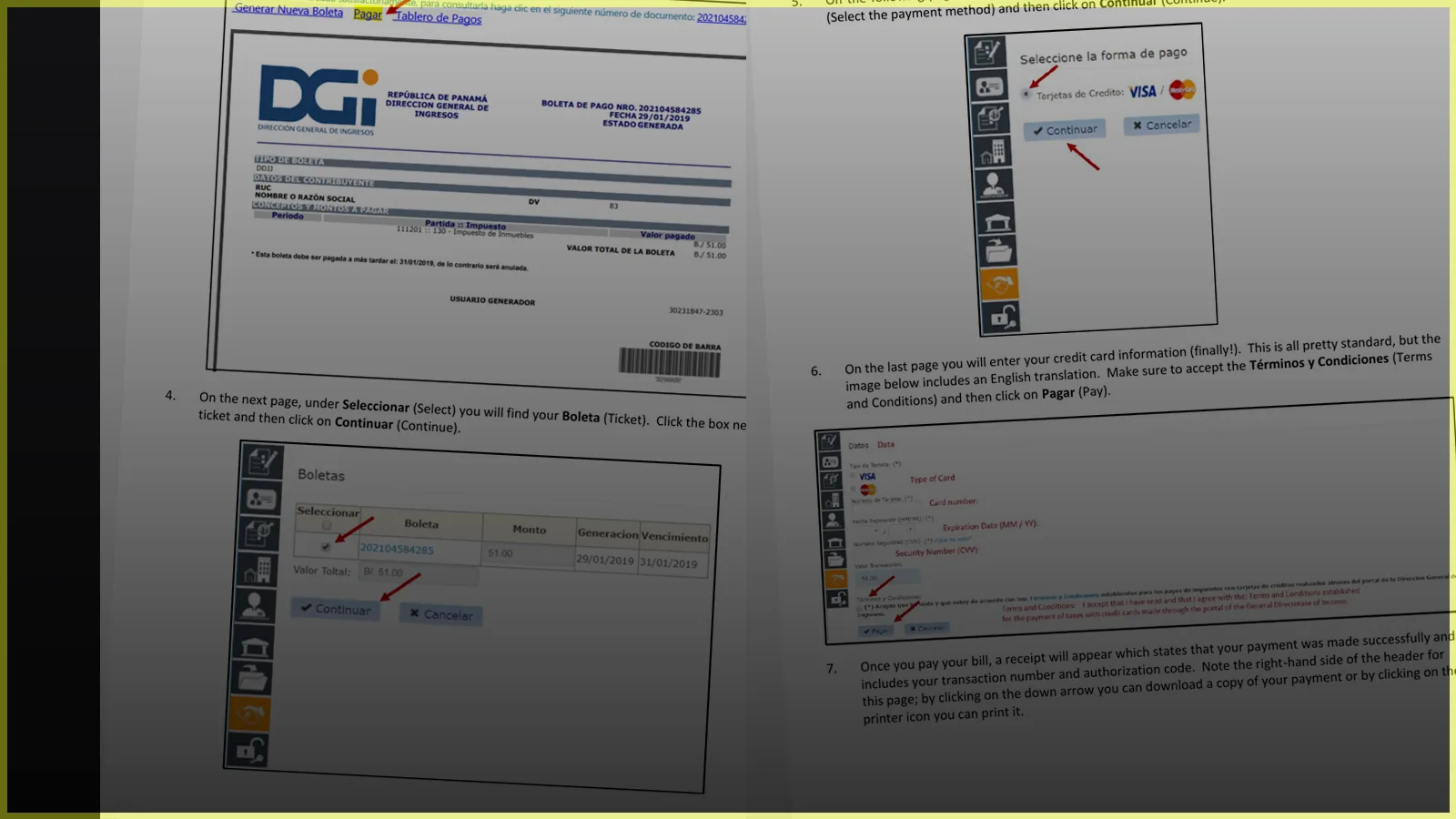
If you want the version with the actual DGI screenshots beside each step, download the PDF and keep it with your property records.
Why This Matters
Most online articles about Panama property taxes explain the rates. That is useful, but it is only half the story. A low tax bill is still a problem if nobody pays it.
Panama's tax authority, the Direccion General de Ingresos (DGI), keeps taxpayer balances in the Cuenta Corriente Tributaria. In plain English, this is the tax account ledger: the place where DGI records charges, payments, pending debts, interest, fines, and surcharges.
This is where many foreign owners get caught. They buy a condo, hear that Panama's property taxes are low, and assume they will receive a normal annual notice. No envelope arrives. No one knocks. Years pass. Then they decide to sell and the closing attorney asks for the property's paz y salvo, which is the tax clearance certificate. The property's paz y salvo is required for a real estate transfer, and it confirms the taxpayer has no pending obligations on the property that would prevent title from transferring to a new owner.
So the real rule is simple:
If the finca has unpaid taxes, interest, penalties, or other DGI issues, you will have to clear them before clean title can transfer.
That is not a fun closing-day discovery, and it happens more often than people expect. It creates unnecessary stress, extra expense, and delays in a moment when everyone wants the sale to move smoothly.
The basic habit is to pay on time three times per year, roughly every four months, so you avoid interest and penalties. The better habit, if your account is current, is to pay once at the beginning of the year and take the discount.
The January Move: Pay Once, Save 10%
DGI says property tax can be paid in three installments during the year, and that a 10% prompt-payment discount applies when the annual property tax is paid before April 30, as long as the account is not delinquent.
Our practical advice: do it in January.
Not because January is the legal deadline. It is not. January is just the cleanest habit. The holidays are over, the year is new, DGI screens and rules can change over time, and it is easier to handle the finca before it becomes another loose end.
Here is the basic idea:
- Log into e-Tax 2.0 early in the year.
- Check the full annual property tax amount.
- If there are no old balances, calculate 90% of that annual amount.
- Generate a boleta for that 90% annual payment.
- Pay it and confirm the DGI account shows the payment credit.
For example, if the three installments for the year add up to $900, the 10% discount is $90, so the annual payment is $810. Not a bad return on investment!
If the finca has past-due balances, do not assume the discount will work automatically. DGI says the overdue balance must be paid first. Once you see that payment reflected in the account, then, in a separate boleta, you pay 90% of the current year's annual property tax so the system recognizes the prompt-payment discount.
Before You Log In
Have these items ready:
| Item | What it means |
|---|---|
| Finca or inmueble number | The property's registration number. Finca is the common registry term; inmueble means real estate/property. For this process, they are pointing you to the same property record. |
| Codigo de ubicacion | The location code that goes with the property number. It may appear in your deed, closing documents, DGI email, or attorney's file. |
| DGI user / RUC | RUC means Registro Unico de Contribuyente, or taxpayer ID. For many property tax accounts, the user/RUC is based on the finca or inmueble number plus the location code, often shown as the property number plus a dash and code. Use the exact value from DGI or your closing documents. |
| NIT | The DGI tax login credential used with the user/RUC. Your closing attorney can often help obtain or confirm it when the property is transferred to you. |
| Registered email | DGI requires an email associated with the finca for online access and property-related notices. |
| Payment method | A debit or credit card, if paying inside e-Tax 2.0, or access to an approved bank channel. |
| Records folder | A place to save the confirmation, downloaded payment copy, or screenshot for your own records. The DGI account balance is what matters later, but keeping your own copy is still smart. |
DGI notes that owners can use e-Tax 2.0 with the property number and location code, and that the property should have an email address registered in the system. If your email is not registered or your login does not work, ask your closing attorney to help update the finca email, obtain the NIT, or restore DGI access.
English vs. Spanish Screens
The DGI website is in Spanish. Browser translation can help, but when you are paying a government balance, you want to recognize the exact Spanish labels on the screen.
In the steps below, I use the Spanish menu names first and explain them in English:
| Spanish label | Meaning |
|---|---|
| DGI en linea / e-Tax 2.0 | DGI online tax system |
| Iniciar Sesion | Start session / log in |
| Consultas | Consultations / lookup |
| Pagos | Payments |
| Cuenta Corriente | DGI account statement / tax balance ledger |
| Inmuebles | Real estate / property tax category |
| Recaudacion Bancaria | Bank collection / payment area |
| Generar Boleta | Generate payment ticket |
| Pagar | Pay |
| Tarjetas de Credito | Credit cards |
This is also where the screenshot guide is useful. The article can explain the words, but the PDF lets you compare your screen to the real DGI flow as you go.
Step 1: Go to DGI and Log In
Go to dgi.mef.gob.pa and choose the online tax system, usually shown as DGI en linea or e-Tax 2.0.
Click Iniciar Sesion.
Enter the user/RUC and NIT for the property account. For many finca accounts, that user/RUC is based on the property number and location code, but use the exact information from DGI, your DGI email, or your closing attorney. You may also need to complete a reCAPTCHA. If the reCAPTCHA is in Spanish, browser translation can help, but do not translate the actual account values you enter.
Step 2: Check Past Payments
Before paying the current balance, it is smart to confirm what has already been paid.
Inside e-Tax 2.0, go to:
Consultas > Pagos
Use the dropdown for Tipo de Envio and choose Todos, then click Buscar.
Prior payments should appear in the results. The amount paid is usually shown under Valor Pagado.
This is especially useful if you bought recently, inherited a property, changed property managers, or are not sure whether a prior payment was applied correctly.
Step 3: Check the Current Property Tax Balance
Next, go to:
Consultas > Cuenta Corriente
Click Buscar.
Look for the property tax category. In many DGI screens, property tax appears under 130-Inmuebles and then 3-Inmuebles. Think of this as the property-tax line item inside the DGI account statement. Open that line to see the detail.
The detail screen may show:
- The tax period
- Due dates
- Tax amount
- Interest
- Fines
- Surcharges
- Credits or prior payments
- Total due
This is the screen that matters. It is where the property tax balance becomes visible.
Step 4: Decide Whether to Pay Annually or by Installment
DGI states that Panama property tax can be paid in three installments:
- April 30
- August 31
- December 31
DGI says a 10% early-payment discount applies when the annual amount is paid before April 30 and the account is not in arrears. In practice, that means the best owner habit is to check the account in January, add up the year's installments, pay 90% of that annual amount if the account is clean, and confirm the DGI account credits the payment through the end of the year.
If there is old debt, pay that older balance first. Once you see that payment reflected in the account, generate a separate boleta for 90% of the current year's annual property tax. DGI specifically says the separate boleta is how the system recognizes the discount.
If you choose installments instead, put the next payment dates on your calendar yourself. DGI will not manage your calendar for you.
Step 5: Generate the Payment Ticket
To pay from inside e-Tax, go to:
Recaudacion Bancaria > Generar boleta a partir de CCC
The system should fill in the taxpayer identification and name associated with the account.
Under Tipo de Cuenta, choose Tributos.
You should then see the debt data for the year. Remember, the boleta is not the receipt. It is the payment slip you create before paying. If you want to pay the full annual amount without the discount, select the full amount. If the account is current and you are using the 10% prompt-payment discount, enter 90% of the annual amount under Valor a Pagar. If you are paying one installment, enter that installment amount.
Then:
- Check the box under Sel.
- Confirm the amount beside Total Valor Boleta
- Click Generar Boleta
DGI calls this electronic ticket the Boleta de Pago Multiple Electronica or BPME. It is generated inside e-Tax 2.0 and contains the taxpayer information, selected taxes, amount to pay, ticket number, issue date, status, and expiration information.
Step 6: Pay the Boleta
After the boleta is generated, click Pagar.
Then:
- Select the boleta
- Click Continuar
- Choose Tarjetas de Credito
- Click Continuar
- Enter the card details
- Accept Terminos y Condiciones
- Click Pagar
DGI says taxes can also be paid through other approved methods, including debit or credit cards through e-Tax 2.0, online banking, certain bank collection channels, and DGI cashier options. For most foreign owners, paying inside e-Tax by card is usually the easiest path if the account is accessible.
Step 7: Save the Confirmation and Verify the Balance
The DGI walkthrough shows that after a successful card payment, e-Tax displays a payment confirmation or receipt screen with a transaction number and authorization code. It also shows download and print icons.
If you see that screen, download it, print it, or take a screenshot for your own records. You generally should not need to show that receipt later to get a paz y salvo; DGI will rely on its own system balance. But if there is ever a posting issue, having your own copy is useful.
Then go back to Consultas > Pagos and confirm the payment appears in the DGI system. It may not always show instantly, but the DGI account record is the important thing.
What If You Are Already Behind?
Do not panic, but do not ignore it.
DGI payment information says that when a delinquent taxpayer makes a payment, it is applied to older pending balances of the same nature, and payments are applied first to overdue fines, surcharges, and interest, then to the tax itself.
That means a partial payment may not reduce the principal the way you expect if old charges are sitting ahead of it. If the account is seriously overdue or the balance does not make sense, get help from a Panamanian accountant, attorney, or a DGI office before making assumptions.
Selling? Check the Paz y Salvo Early
If you are planning to sell, do not wait until the buyer is ready to close.
Ask your attorney or closing team to confirm the finca's DGI status early. The paz y salvo de finca is part of the transfer process, and unresolved balances can delay closing.
This is one of those small administrative tasks that can save a transaction from turning stressful.
Quick Owner Checklist
- Check the DGI account at least once per year
- Do not rely on a mailed bill
- Confirm the finca email is current
- Pay every installment on time, or pay annually in January if the account is current
- Save the confirmation, download, or screenshot if e-Tax provides one
- Calendar installment dates if you do not pay annually
- Verify the paz y salvo before listing or selling
- Ask a professional to review any old balance, unexplained interest, or correction issue
If the written steps still feel intimidating, use the screenshot version. It walks through the same DGI process screen by screen, with the Spanish labels shown exactly where you should expect them.
Download the DGI property tax payment guide
Related Resources
Sources and official notes
- DGI's Inmueble page explains property tax basics, e-Tax access, annual installment dates, early-payment discount rules, and property tax brackets.
- DGI's Cuenta Corriente Tributaria page explains how the tax account records debits, credits, balances, interest, fines, and surcharges.
- DGI's Formas de Pagar sus Tributos page lists payment methods, including cards through e-Tax 2.0.
- DGI's BPME page explains the electronic payment ticket generated inside e-Tax 2.0.
- DGI's Informacion de Pagos page explains payment timing, payment methods, and how delinquent payments are applied.
- DGI's Paz y Salvo page explains that the finca clearance is required for a real estate transfer.
This guide is educational, not legal or tax advice. Confirm your own finca status in DGI e-Tax 2.0 and ask a Panamanian attorney or CPA to review any transaction-specific issue.
Download the Panama Property Tax Payment Guide
The article explains the process. The PDF shows the DGI screens step by step, in the same Spanish labels you will see online, so you can keep it open while you pay.
DGI payment walkthrough
Have questions about this article?
Our AI Investment Advisor is ready to answer your questions about Panama real estate, legal processes, and lifestyle.